A common topic for discussion is promotion for small businesses and personal brands. When it comes to social media, the responsibility for promotion falls on the shoulders of the owner (chief cook and bottle washer). Even though my books are published by one of the top 10 publishers in the world, I still need to take responsibility for my own brand.
I’ve personally been promoting my work and books in the real world and online for over 15 years and it’s the most difficult task on my plate. Even on the “About” pages of my websites, I am loathe to blow my own horn. I might consider myself an introvert, or I might just feel the mere act is bragging. To be fair to those who do it well, it takes nerve to think there are thousands of people waiting around to hang on to your latest words or hot new project. We may have products, businesses or books to promote, but not everyone has a similar promotional style.
Perhaps you've heard that social media can help promote your online business. When we deal in e-commerce, we're often wrapped up with the daily, hum drum of advertising, buying selling and shipping. Who has time to add social media to their day?
For more quick video tips, please stop by my website.
Believe it or not, emoticons (or Smileys) have been in use since the
19th century to punctuate written words with graphics simulated by
characters. An historical newspaper specialist found what appears to be a sideways winking smiley face embedded in The New York Times copy of an Abraham Lincoln speech written in 1862 "(applause and laughter ;)";. There is some debate as to whether it is a typo, a legitimate punctuation construct, or an emoticon.
Facebook gives you options to adding your mood (or activity) – to your
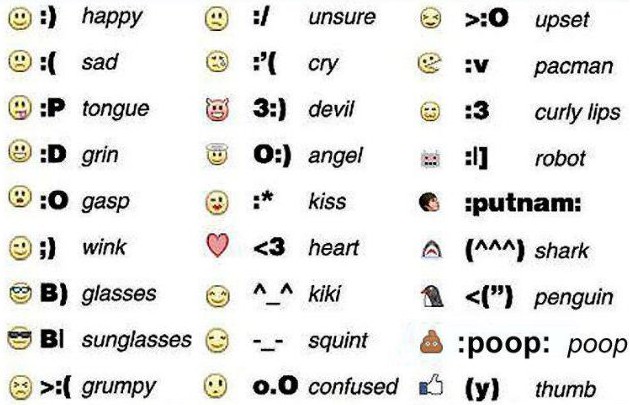
own posts – or to comments you write on your friend’s content. Below are keystrokes you can use to form emoji, and further on I show you how to use Facebook's new mood and activities emoticons within your own posts
When you’re commenting, or in chat, you can type in these characters to add punch to your words:
Friends had suggested I go to SXSW many times, but I never really saw the value. Then in mid 2012, I hear from +Kip Wetzel (whom I admire for his work in taking the reins of the @ComcastCares account in 2011). He told me he had a plan for a panel and when he was through with his convincing pitch, I knew this was a disruptive topic for the customer service industry. My book on the subject came out in 2011; this panel could be groundbreaking. It was time the philosophy of reaching the customer where they want to be reached become the norm.
Kip craftily assembled a group of folks with the backgrounds to handle the topic:
+Carla Saavedra Kochalski "Manager of Social Media & Digital Content for Samsung Mobile USA's Customer Care Team" - but in reality a very talented young woman who truly "gets' the customer and can apply balance to social media custiomer service. She's been a driving force in enterprise-level social media strategy since 2010.
+Bianca Buckridee "Social Media Operations Manager @ChaseSupport" American Banker Magazine said: "She has a thousand-watt smail that never seems to sitch off and a sunny personality that has surely servived her well on the front lines of customer service." She grasped the value of customer social media comments as early as 2009, and has been on a mission to perfect the outreach ever since.
+Brooks Thomas "Southwest Air: Emerging Media. A journalist who's defined "emerging media for his brand. He personalizes the airline's blog with words like, "I know how your morning went down. Your synchronized yawn-and-stretch routine happened as it always does. You almost tripped on a Tonka truck on your way to the bathroom. You groggily stumbled down..." Customers can related to a brand through his words.
Three incredibly intuitive and smart people. It was my job to keep the peace and help steer the conversation. I didn't have to do much steering. To a packed room of 500, we not only got our points across, but engaged the audience ... below is the Powerpoint, and a portion of the panel on video. I hope to see everyone next year and see how the #custserv philosophy has advanced.
Our panel: Bianca Buckridee (JP Morgan Chase), Brooks E Thomas (Southwest Air), Carla Saavedra (Samsung Mobile US) and I at addressed 500 social media, brands and customer service enthusiasts.
The crowd responded with a ton of Tweets including comments, quotes and links that carried actionable insights. Before I post the deck online, I thought I'd share this valuable collection
The world’s largest social network making waves with launch of a new tool called Graph Search.
The tool essentially allows people to discover information based on data that Facebook has collected from its users over time. For example, someone could use Graph Search to discover information such as “restaurants in Chicago that my friends like” or “photos of me that I liked.”
While Graph Search is currently in a limited beta release, the tool seems to improve the social network’s lackluster search bar, which previously only allowed users to search for people or pages on the social network. Moreover, Graph Search has the potential to impact businesses on Facebook. Discover five things you should know about Graph Search below:
1. Likes Matter
Facebook Likes are now more important than ever, especially for businesses. According to a Facebook blog post, Graph Search can make it easier for people to discover and learn more about businesses on Facebook. This is because the search results are based on Facebook’s robust database, which includes information that has been shared by businesses and individuals alike. That being said, businesses with a large fan base will be more likely to turn up in searches for phrases like “restaurants in Chicago that my friends like.”
2. Engagement is Key
Aside from obtaining likes, businesses should focus on maintaining an engaging Page that includes quality interactions with fans. Since the search results are based on information that has been shared by businesses and individuals, interactions between a business and their fans can help the business score higher in the search results. Furthermore, Graph Search also makes interactions like check-ins even more important, because users could potentially search for phrases like “Places in Los Angeles that my friends have been to.”
3. Invest in your Page
Facebook’s blog post states that the best thing businesses can do for their Page is to continue to invest in it and make sure that it is complete and up-to-date. Items like the name, category, vanity URL and information within the “About” section of a business Page can help make it easier for people to find the business on Facebook. Additionally, Page owners should make sure that their business’s address is correct because this information could help someone discover a local business when they are searching for places in a specific location.
4. There are No Graph Search Ad Formats…Yet
As Graph Search becomes more widely available, so will the speculation of a new ad format from Facebook. However, the social network confirmed in their blog post that there are currently no new ad formats available for Graph Search. However, it is important to note that Pages and apps can still use the Sponsored Results ad format to show up in the search results for all Facebook users, whether they have Graph Search or not.
5. Sign Up to Try It
Graph Search is currently in a limited beta release, which means that you must sign up for a waitlist to gain access to this tool. According to Facebook, the rollout of Graph Search will be gradual, starting with a very small number of users. This means that the company is still working out some of the bugs in order to provide the best search results possible to its users before the tool is available to everyone. Original Post by Allison Howen
Here are four marketing strategies you don't want you to forget. Commerce is your goal — but "social" will get your business front and center with prospective customers. Include videos and engaging content on your website, and interact on other sites and blogs.
Keep your website fresh: With all the pressure about posting in social media, keep in mind that ultimately you need to direct visitors to a core website where they can learn all about your business — and make purchases. Create a web presence that reflects your business and your company culture. Make it accessible and engaging.
Include instructionalvideos: Build a library of Facebook videos or YouTube uploads that pertain to your business and demonstrate your products. Link to these videos from your website and post them on your Facebook business page.
Friend and tag other businesses onFacebook: It's just as easy to tag friends on your Facebook personal page and fans on your business page, but you can also tag other business pages as well. See the screenshot above. Go to friendly businesses and "Like As Your Page." Be social — and help spread the word — by including other businesses in your posts.
Make social media fun: Keep the social conversation going. Post more often on a couple of sites instead of posting rarely on many. Aside from posting relevant content regularly (and not self-promoting all the time), reply to those who post to your accounts. Answer and ask. The most desirable social media personas are those who interact regularly.
Let's talk on Twitter! You'll find more tips in my book pictured below, "Social Media Commerce for Dummies"
To many people, it's not news when I come out with a new book, I write books for a living; I don't write books to get speaking engagements. What most people don't realize is that writing and researching is my passion. Readers can go on the web and get "common knowledge" anywhere. My secret sauce is the pressure I put on myself to delve deeper. There will be no mention of a hot new tool unless I personally have tried it - and have checked out the company who provides the service. Nor will I tout expensive solutions, I know small business needs to run a tight ship. Money is time - and time is money.
The reader is my customer. In over a decade of writing on e-commerce and customer service, I feel a strong responsibility about what I write. I don't want to steer anyone in the wrong direction. When you read one of my books for small business (whether the book is directed at beginners or advanced readers), know you are getting honest and well-thought out advice. My books reflect hundreds of hours into investigation into the tools, strategies and ideas in each book. I try to update my books to a new edition every 18 months, so the information is always fresh.
I especially enjoy, over the years, getting emails from my readers. I put my email address in all of my books - even back in the 90s when people thought I was nuts for doing so. Readers keep me apprised of their successes and failures.
Below is the first review of the book that appeared on Amazon (I'd like to thank "Dad of Divas" whoever he is). I hope you'll give my latest book a look. I think it might clear up some social media misconceptions for you. You will find it here.
Thank you to everyone who has read my books. If you've never read one, I think this book might be a great place to start. (Here is the press release from my publisher - I've never thought of myself as a "blockbuster)!
Wiley Announces Latest Book by Bestselling Author Marsha Collier - Social Media Commerce For Dummies®
Blockbuster author Marsha Collier empowers brand owners to capture customers, sales and revenue using social media
Social Media Commerce For Dummies
Indianapolis, IN (PRWEB) December 13, 2012
Today, the world’s bestselling reference series, For Dummies® announces Social Media Commerce For Dummies (Wiley, 978-1-118-29793-3, November 2012) to help brands and small businesses understand why social media is important to their bottom line and how to adapt their online presence to include social commerce.
The undisputed expert on eBay and a recognized authority on social media marketing, author Marsha Collier delivers another one-of-a-kind For Dummies guide that introduces readers to social media commerce and explains how to use social media to provide better customer service, generate sales online and build a customer base. Social Media Commerce For Dummies helps readers determine where the best market reach opportunities exist, which sites to integrate with, and more.
"Social media enables small business -- even professionals -- the opportunity to compete on a level playing field with big brands. After much research, I've found the strategies in this book will change the marketing game as we know it,” said Collier.
Social Media Commerce For Dummies is now available for purchase online and at retailers nationwide in both print and all e-book formats. For a full list of retailers, visit http://www.dummies.com/buy/9781118297933. Additionally, the Cheat Sheet on Dummies.com includes helpful hints for social media commerce including useful Facebook keyboard shortcuts, Marsha’s Social Media Commerce Toolkit and more. For additional information about this book and related For Dummies products, visit http://www.dummies.com.
About the Author Marsha Collier (Los Angeles, CA) is the world's bestselling author on eBay topics. Her books combine for over a million copies in print. Leading titles include eBay For Dummies, Starting an eBay Business For Dummies, and eBay Business All-in-One For Dummies. She has recently branched into social media topics, authoring Facebook & Twitter For Seniors For Dummies and The Ultimate Online Customer Service Guide. Marsha is also an in-demand speaker and trainer who appears at over 50 events per year.
About For Dummies® After 20 years, more than 250 million copies printed, and millions of e-books downloaded, For Dummies is the world’s bestselling reference series, well known for enriching people’s lives by making knowledge accessible in a fun and easy way. Loyal customers around the globe agree that For Dummies is “more than a publishing phenomenon … [it is] a sign of the times,” [The New York Times]. With more than 1,800 active topics covering everything from health to history, music to math, sports to self-help, technology to travel, For Dummies is dedicated to Making Everything Easier. The For Dummies brand presence continues to expand wherever there is a need to know, including e-books, mobile apps, e-learning courses, a corporate custom publishing program, a robust consumer website and a licensed product line that includes consumer electronics, culinary, crafts, video, software, musical instrument packs, home improvement, automotive, game and more. For more information, visit Dummies.com. For Dummies is a branded imprint of Wiley.
If you intend to promote your brand and interact with customers through social networks and social media channels – and I highly recommend that you do – you must realize your employees will be there as well, with their own personal accounts. There’s no reason not to encourage your employees to explore and engage in social media communities online, but remember, they are also the face of your company to all their friends and associates – as well as to the customers they know. What they say online or the type of photos they post on their personal accounts may reflect, albeit in a roundabout way, on your business. When they directly talk about you or your business, it will have a cause and effect relationship.
It is your job to guide your business’s online culture and protect your brand’s online persona. Provide guidelines for your employees in the form of a Social Media Policy. This written document, similar to other codes of conduct you have for employees, will let them know what type of behavior you expect from them online and any limits as to what business-related information they can share in the public stream.
Here’s how one of our nation’s biggest companies handled it. Back in 2009, before most people thought about setting guidelines, Adam Brown broke ground by developing a 4R social strategy (review, respond, record, redirect) and spearheaded the development of social media guidelines for the Coca-Cola Company. Aside from designating a code of conduct for their official online spokespeople, Coca-Cola also laid out specific principles for their associates. By taking a look at what Coca Cola deemed appropriate, perhaps it will help you forge a set of standards for your own employees. From Coca-Cola’s Online Social Media Principles, the guidelines below with my explanations outline expectations for any online activities – personal or professional – where employees reference the company or have made their association with the company known.
“Adhere to the Code of Business Conduct and other applicable policies” – Coca Cola has several policies regarding specific business activities, including general conduct, information protection and insider trading. All employees (from the CEO to interns) are expected to follow these when mentioning online that they are employees of Coca Cola.
“You are responsible for your actions” – This point is a reminder to exercise sound judgment and common sense when posting online because employees will be held responsible if their actions negatively impact the business or its image.
“Be a ‘scout’ for compliments and criticism” – This guideline acknowledges that employees are “vital assets for monitoring the social media landscape.” Coca-Cola even supplies an in-house email for forwarding both positive and negative comments employees observe online, so they can feel confident negative situations will be addressed without feeling like they must be the one to take action.
“Let the subject matter experts respond to negative posts” – This point stresses, again, that should employees encounter a potentially damaging post about the business, the post should be referred to those trained and approved as official online spokespeople to handle responding.
“Be conscious when mixing your business and personal lives” – This principle recognizes that personal and business personas often intersect online and reminds employees that everything that is posted online – even when channels or profiles are “private” or “protected” – can still ultimately be seen by anyone at any time through sharing, forwarding and general unintentional carelessness.
Want to succeed as an online seller? Too many folks try to tell you how easy it is. Bottom line? It isn’t easy – especially the part where you actually try to make a profit. You have to keep up with changes in the market— like shifts in consumer buying behaviors— study from tried and true experts, and practice!
The best place to get a feel for online selling is on eBay. I’ve written many bestselling books on the subject, and I’m a Top Seller on the site. Remember that you can’t make a dime if you don’t actually list anything, and you probably won’t be successful without making a few mistakes. But, you can also learn from the successes and mistakes of others. So in this post, I want to offer some advice on how to create listings that sell – and how to earn the most profits from those sales!
1. Listing title. Nothing is more important than your title. You’ve no doubt heard about SEO (search engine optimization). Well, you can apply these same practices on eBay to increase sales. It’s all about “keywords” – the terms people will use to search for your item. Note that rarely would anyone search for a “beautiful” sweater. More than likely, someone would search for a sweater in a certain size, color, fabric, brand name, sleeve length – get it? Do not waste your 80 characters (total allowed on eBay for your item title) on fluffy adjectives or adverbs. The item title does not have to be a proper sentence; instead, be sure to make the verbiage descriptive with practical details. Since eBay buyers see less than the full title listing when browsing (mobile only shows 25 characters), keep the less important words at the end. Search will find the matching words anywhere in your title when someone searches for them.
Bonus Tip: Use tools like Google’s Keyword Tool (used by advertisers who place ads with Google) or Title Builder, an accurate eBay-centric search tool to identify top keywords people search for.
2. Pictures. You may post up to 12 pictures at no charge, but most new items can be illustrated completely in just two clear, well-lit photos. Be sure the photos you upload are at least 500 pixels wide or you run the risk of eBay rejecting them. Use multiple photos if you are selling a collectible or rare piece so that you cover every possible angle. Be sure to photograph any flaws so the customer can effectively evaluate an item’s condition before bidding on or buying vintage items. If you would prefer to show images within your description, go to the HTML description builder and use the code <img src=”URL of the photo on the web” height=”height in pixels” width=”width in pixels“>. When shooting images of jewelry, coins or anything detailed, use your camera’s macro setting. Do not use any fancy backgrounds that may distract from your item.
Bonus Tip: To accurately portray colors of metals, use a Cloud Dome (or Cloud Dome Nimbus for smartphone cameras). It holds your camera steady and uses a mathematical formula to reflect light at exact angles for the best images possible.
3. Price it right! Check eBay’s completed listings search to see if your item actually sells well on the site and how much similar ones have sold for in recent auctions. Prices and trends may change by the minute and there is no point in listing when an item isn’t selling well. Check current listings too: How many sellers are selling your item? And at what price? As with any market, eBay items sell based on supply and demand. Choose your items carefully, price strategically and put slow selling items in your store. If you have a bit of wiggle room in your pricing, consider using eBay’s “Make Offer” option when listing. This way you can determine the sale price based on a customer’s offer. You can make up to 3 counter-offers to a buyer. Free shipping is also a good strategy for attracting customers and can make your listing seem more appealing than another seller with the same or a similar item – buyers feel like their money is going further, and there’s no guessing as to what cost the final invoice may reflect.
Bonus Tip: Double check your profit margin before you list. Although eBay has fee calculators, one of the best I have found is at http://salecalc.com/ – this tool takes all fees and expenses into account and gives you an accurate picture of how much you will make on your item if you sell it at a certain price point.
4. Don’t ignore the value of Customer Service. Good customer service will set you apart (and give you a leg-up on the competition from big brands) by letting the customer know you care. Communicate with your customer, even within your description. Let the customer know you are invested in their happiness with the purchase. Sell to international customers; American goods are very popular overseas. Putting the customer first through stellar customer service promotes repeat business and helps you reach the goal of Top Seller Status (where you receive a 20% discount on final value fees and are advantaged by eBay’s Best Match search algorithm). Find out more about Top Seller Status here.
Bonus Tip: Print out “thank you” notes and include them in your orders. Include information about you, your website or other merchandise you carry. Consider also offering customers a discount on their next order.
5. Ship the item out FAST! Know when your auction listings are scheduled to end, and be prepared to immediately pack and ship any items that have sold. For “Buy It Now” listings, set aside a few minutes each day to take care of shipping needs. Once the customer has sent you money, the item belongs to him or her – it no longer has a place in your inventory area. Keep a stock of shipping supplies (padded envelopes and free Priority Mail® packaging here) that match the items you sell. Use First Class mail whenever possible for items less than 13 ounces and send them in a bubble wrap envelope to save on weight. When it comes to shipping costs, box weight can make a big difference, so you might consider Priority Mail® Flat Rate Boxes, depending on the size and shape of the item. Priority Mail® Regional Rate Boxes can also be an economical option, depending on your shipping destination. Use the postal zone charts at this link to calculate shipping rates from your ZIP Code. Remember, Top Seller Status, which can increase your profit margin, is impacted by how buyers rate your shipping time and shipping costs.
Bonus Tip: As your business grows, no doubt you will sell on other sites like Etsy, Amazon, Facebook or your own website. Keep all your shipping records in one place: on your computer. Use this link for a 60 day trial to DYMO Endicia and see how easy postage and shipping can be. http://bit.ly/free60days
Can social media be used to help you make money? Yes it can. I've learned a lot while writing my upcoming book, Social Media Commerce For Dummies and I want to share with you. Submit pre-chat questions or ask them live. Let's share strategies and tactics to help your business make the most of social commerce.
On Facebook, demographics are everything. Knowing your fan base, and the fan base of your competitors can mean the difference between creating engaging page content or failing to connect with potential fans.
Here is a quick way to get the inside scoop on your Facebook competition to make sure that you’re targeting the right audience with your Facebook page content.
Step 1 – Identify your Facebook competition
Though this is rather self-explanatory, it makes sense to keep an eye on your Facebook competitors. What brands are operating in the same space as you? Identify them and “Like” their pages. Take note of what they post, how they engage, and what kind of content they share with their fans. (To do this you must visit them from your personal Facebook profile, not your business page)
Step 2 – Visit their Facebook Page and Click on the “Likes” tab
On each Facebook page that is timeline enabled, personal users can click on the “Likes” tab at the top of the page to get a quick snapshot of the company’s fans. This is where you gather the data.
Click the Likes tab to view a snapshot of your competition’s fans.
Step 3 – Study Like Data to Determine the Fan Base
After clicking the Like tab, you’ll be presented with a nice summary of your competitor’s fan page data. Take note of it, and compare it to your own page’s analytics. What do you see in common? Are you reaching the same audience? Do you have similar peaks in traffic? Maybe you have nothing in common with your competitor’s page. This could be good or bad, depending on which page has the most engaged users, or those “talking about the page.”
Obviously, Facebook doesn’t reveal all the statistics of other fan pages, but with this limited information, you should at least be able to identify strengths and weaknesses between your page and your competitors’ pages. Use the data to inform your content decisions, and finally, don’t forget to keep checking in on your competitors. Facebook is always changing, and so are page management strategies. By checking your competitors’ Like tabs, you can at least be sure that you’re operating within similar demographics.
Do you know your Facebook competition? What are you doing to stay competitive?
Social networking demands the attention of today’s small businesses... right along with online reviews and customer feedback. But, with time at a premium, where should you go to reach your customers and maximize your social media efforts? Articles all over the web tout one site over another, claiming this one is best or that one will draw your customers’ attention. What’s more, there always seems to be another emerging social media platform around the corner. Is it any wonder that small businesses get confused about where to focus their time?
Even before you make your initial foray into social media, defining objectives should be your first step (hint: stating that you want to increase sales is too general). Return on investment (ROI) will be different for each business depending on your goals. Drawing shoppers to eBay, a Facebook store or your website may each take on a slightly different tack.
Before you start utilizing a social media channel, you also need to understand and know your customers. You find them where they spend time on the Web and reach them with content appropriate for the various platforms. Keep in mind that social media channels are designed for “social networking,” not broadcasting – you must interact with fans and followers. Pepper your promotions not more than one in six of your posts on a particular platform.
Here’s a quick overview of the top social media communities you might want to be part of with your business:
Facebook. Facebook is personal. Here you need to reach customers on a personal level. Sharing information or facts that relate to your business and to customers’ everyday lives will bring you more likes and shares. Graphics and photographs are very appealing to this audience.
YouTube. YouTube for ecommerce is all about demonstrating your products. If you have a product that would benefit from demonstration, by all means make a short video. Embed or link to that video on your other social media channels.
Twitter. The short message service that has taken the world by storm is a great way to build your online community. But to be relevant and build trust on Twitter, you need to spend time online meaningfully contributing to the conversation, not just posting links to your website or to items for sale. Respond to questions and re-tweet comments or facts of interest. Your goal is to sell to a community, not to become a spammer.
Google+. If you deal in technology and deal internationally, Google+ may be ripe to help you find new customers. The site slants highly to men and the bulk of the participants on the site are in technical fields. The number one occupation on the site is Student, and only 32% of users are in the United States. All that said, it is a perfect platform to interact with those who appreciate technology. Engage with long-form posts and video content. Take advantage of Hangouts to build your reputation as an expert in your category.
Pinterest. The jury is out as to whether Pinterest is truly monetizing for the small business. Post selected items (by no means every item you sell) and be sure the links are updated to direct to the actual item for sale in your online store.
The topic of the book I've just finished writing is social media commerce. This infographic guides you through the process I've covered ...
The proliferation of social media has led to a new form of e-commerce: social commerce. Psychologists have analyzed the thoughts and behaviors of “social shoppers” to determine what drives them to a purchase.
Facebook has now provided a way for you to curate content right on your Facebook page via their new Facebook Interest Lists functionality. When you log in to your present Facebook News Feed you have access to aggregate content from your Friends and individual pages you’ve “liked” that Facebook’s Edge Rank (an algorithm) deems relevant to your account.
Facebook has created Facebook Interest Lists to give you another way to access targeted content via their platform by creating your own personal (or brand) newsfeed comprising individuals or pages that you want to receive information from.
To Create Facebook Interests Lists:
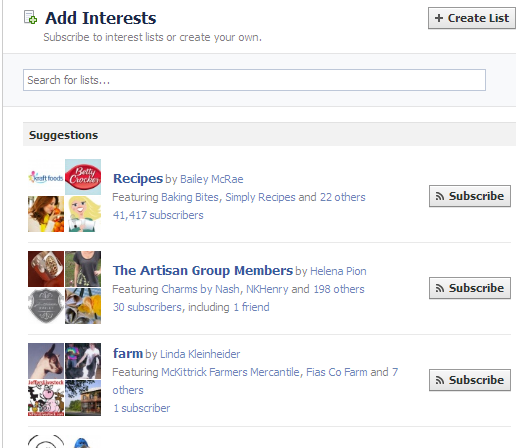
You will easily find “Interests” at the bottom left of your page at the bottom of the column. Just click on it and Facebook will open a page like this image below with preselected Suggestions broken out in Categories, which also shows you the Number of Subscribers and any Friends that you may have.
“Suggestions” which are optimized for your account are at top of page and then these Categories:
Art
Books
Business
Causes
Entertainment
Food
Games
News
Politics
Sports
Technology
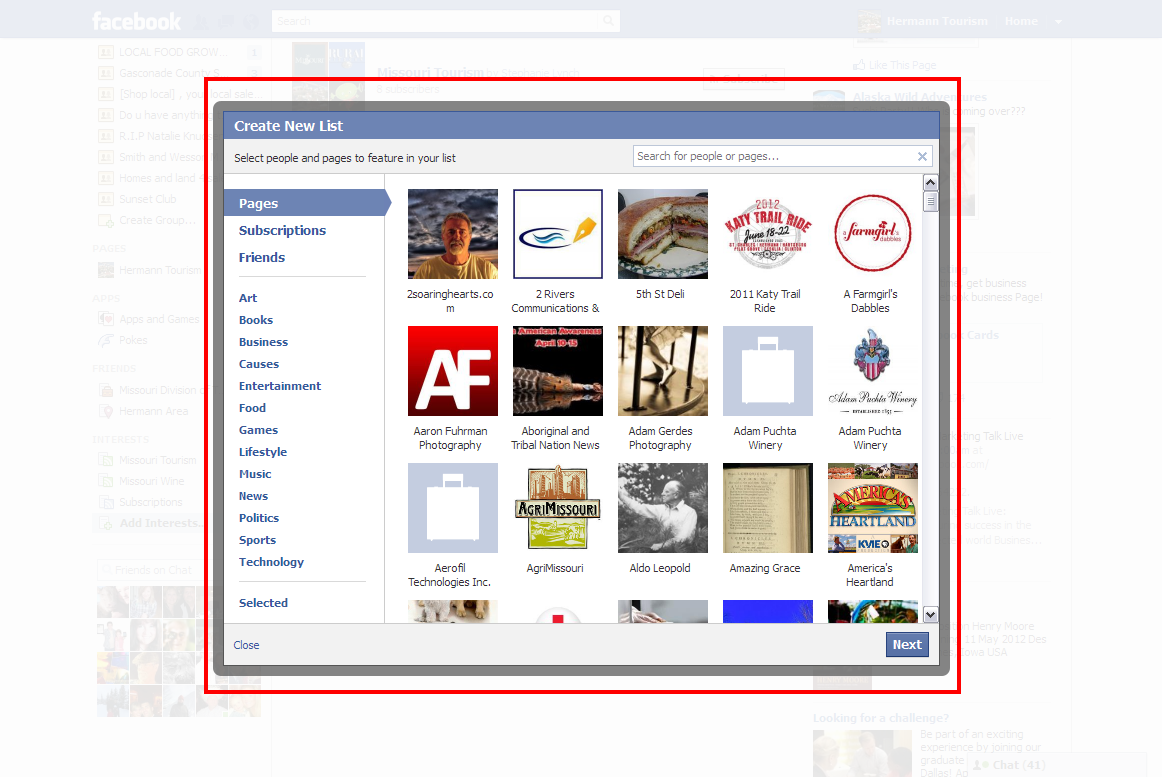
Note in this screenshot above you have the ability to do a Search as well and then create a list of your which will show your Friends and Pages you are connected to via your account:
Once you’ve selected your Friends, Pages, Subscriptions or Individuals from the Specific Categories name your list and then save it. Note: you will also be asked if you want this Facebook List to be Public, Friends or only Yourself. Select these options and then hit save. As soon as you complete the process you will be taken to the Newsfeed of this List, enabling you to check how you set it up.
How Brands Can Generate Marketing ROI using Facebook Lists:
Your aggregating the best or optimum content for your audience. If you make your list public others can see and then subscribe to your list, which generates exposure.
Make sure you add yourself to your list of course – this helps to also create broader exposure for your brand and Page.
Like anything social media marketing process – try to niche in as much as possible. Expect millions of lists to be built moving forward. So, in your self-interest to make sure your list is curated for a specific niche, geographic location or market segment.
Remember, the more Friends who sign up for your lists the exposure your lists will generate and they will also garner more authority your lists have when others are searching.
Bit off topic but related – make sure you have your Facebook Settings set up so others can Subscribe to your public updates. This is a simple check box. Will help to drive more engagement moving forward.
Think of Facebook Interest Lists as valuable content curation that is effective for your Facebook page but that can also be used as a content source for your other social media profiles and accounts.
This post from @jasonkeath rings close to home for many of us. I thought it's time to revisit his post and chuckle together for a Monday!
I really hate when I have to deliver bad news to our readers, but the fact is, I know many of you are in danger of this illness. I personally have been battling against it fairly publicly, and yet I have noticed many of you might even have it worse.
Those of you at standing desks right now might want to sit down. Some of you ARE in fact social media professionals.
I know, it sounds horrible. And there really is no known cure to date. So you might be asking yourself “This is horrible, how can I tell if I have it?” Well, luckily, there are some clear signals that you might be afflicted.
These are a few of the warning signs…You might work in social media if…
Your parents keep up with your life through your Twitter feed.
You are actually using Google+.
You have sent a DM to someone sitting within 5 feet of you.
It’s been years since someone mentioned news to you that you hadn’t heard already. - Derek Shanahan
You verbally hashtag real world conversations.
You are the mayor of something other than your home. - John Hondroulis
You judge anyone with a hotmail email address as not so hip.
You own a t-shirt or jewelry with your Twitter handle on it.
You look down on anyone that does not own an iPhone.
You look down on anyone that does not own an android.
You secretly judge blackberry owners.
You run into people you have not seen for years and they know everything about your life through Facebook, Twitter and your blog. – Inspired by DJ Waldow
You secretly judge QR codes that are on subway ads or in airplane magazines. – Inspired by Scott Stratten
You sign up to social networks before there is any discernible value, just to be an early adopter.
You have reached the friend limit on Facebook.
You know that there is a friend limit on Facebook.
Your mom just tells her friends that you work “on the internet” – Inspired by David Spinks
You checkin to a restaurant before actually speaking to anyone there.
You not so secretly judge anyone following more people than are following them on Twitter.
Your phone is usually face up on the bar or restaurant table when you are out.
Your couch has Twitter, Facebook, Foursquare or Angry Bird pillows.
Your world feels like it’s coming to an end when you get a low battery alert on your smartphone - Elysa Rice
You take photos thinking about how they will look on Facebook.
You read whatever news you find on Facebook and Twitter.
You are haunted by the Tweetdeck chirping sound. - Nicole D’Alonzo
You secretly judge magazine and TV ads that promote their social profiles poorly.
You secretly hate friends who have more Twitter followers than you.
You have a backup plan for when Twitter goes down.
When you have bad customer service, your first step is to find the company’s Twitter handle.
You complain about how bad Klout is while still signing in to check your score everyday.
Your smartphone is your best friend.
You hate when people use the word “viral.”
You think of @GaryVee every time you see an orange Crush soda.
You read Mashable more than you read the USA Today.
You know what a bookmarklet is.
You have Google alerts setup for your own name.
You are working on a ‘strategy’ for people to like you. – Ryan Boyles
You love Twitter.
You secretly hate Twitter.
You respect Justin Beiber for his Twitter following and recently learned he plays music too.
You assume someone is talking about social media instead of pending nuptials when they mention the word “engagement”. – Dave Cutler
You get bored reading news that is longer than 140 characters.
All of the parties and events you go to are from Facebook invites.
Spike Jones has ever made fun of you. – Inspired by Jason Falls
No one in your family is capable of explaining to their friends what exactly it is that you do. - Mandi Laine
Your significant other asks, “Are you still working, or just tweeting?” – Ryan Boyles
You never ask to redeem Foursquare specials because you hate explaining them to your server.
You think that your friends that are not on Facebook don’t have birthdays.
Your use Pinterest to write your letter to Santa. – Inspired by Nicole D’Alonzo
You ask your coworkers and friends for a “big favor” — to help Retweet your latest client’s Twitter campaign.
You are fully aware that Auto DMs are what is really wrong with America.
When you completely lose your voice, you use Twitter to ask those sitting with you to “pass the butter, please” #truestory – Lea Marino
As much as you say you hate the term you secretly hope that someone calls you a “guru” – Simon Salt
Have family in Seattle? Join me at Microsoft Campus, Building 33 for a FREE Get Connected workshop on Facebook, Video Chat, Safe Socializing on the Internet and more - co-sponsored by AARP Wednesday July 25. Lunch will be provided! Reserve your seat today. Space is limited. RSVP online or call 877-926-8300 toll free
I came across this infographic full of good data. But they left out some major points, which tell exactly why Google+ isn't working out for US business right now:
Student is the number one occupation of Google+ users. Coming in way behind for second place is Software Engineer, third is Consultant
Currently, only 32% of users are from the United States
For now, focusing your business on Google+ might not be for you. Remember? Fish where the fish are!
It's not your old e-commerce anymore, social commerce is taking over the online shopping arena. The infographic below was developed by the folks at Want Technlogies from data aquired at IRCE 2012. There, successful brands revealed their internal site metrics - sharing their users’ behavior and how they’ve been able to leverage those basic human yearnings (sharing, discovery, fantasy) and turn them into more sales.




 Post by